'%20stroke='%23ADB7CD'%3e%3cg%20id='斜线'%20transform='translate(466,%20173)'%3e%3cline%20x1='0'%20y1='10'%20x2='5'%20y2='0'%20id='路径'%3e%3c/line%3e%3c/g%3e%3c/g%3e%3c/g%3e%3c/svg%3e)
MostLogin: Free Anti-Association Antidect Browser, Empowering Multi-Account Management and Automated Operations
MostLogin: Free Anti-Association Antidect Browser, Empowering Multi-Account Management and Automated Operations
'%20fill='%23ADB7CD'%20fill-rule='nonzero'%3e%3cg%20id='日期'%20transform='translate(428,%20369)'%3e%3cpath%20d='M15,2%20L19,2%20C19.2652,2%2019.5196,2.10536%2019.7071,2.29289%20C19.8946,2.48043%2020,2.73478%2020,3%20L20,19%20C20,19.2652%2019.8946,19.5196%2019.7071,19.7071%20C19.5196,19.8946%2019.2652,20%2019,20%20L1,20%20C0.73478,20%200.48043,19.8946%200.29289,19.7071%20C0.10536,19.5196%200,19.2652%200,19%20L0,3%20C0,2.73478%200.10536,2.48043%200.29289,2.29289%20C0.48043,2.10536%200.73478,2%201,2%20L5,2%20L5,0%20L7,0%20L7,2%20L13,2%20L13,0%20L15,0%20L15,2%20Z%20M13,4%20L7,4%20L7,6%20L5,6%20L5,4%20L2,4%20L2,8%20L18,8%20L18,4%20L15,4%20L15,6%20L13,6%20L13,4%20Z%20M18,10%20L2,10%20L2,18%20L18,18%20L18,10%20Z%20M4,13%20L6,13%20L6,15%20L4,15%20L4,13%20Z%20M8,13%20L16,13%20L16,15%20L8,15%20L8,13%20Z'%20id='形状'%3e%3c/path%3e%3c/g%3e%3c/g%3e%3c/g%3e%3c/svg%3e) November 14.2025
November 14.2025
In today's digital age, multi-account management and anti-association tools have become essential for professionals in various industries. Especially for those involved in cross-border e-commerce, social media marketing, or ad placement, efficiently and securely managing multiple accounts without being detected for association risks is a common challenge. MostLogin, as a leading free Antidect Browser, is helping users tackle these issues with its powerful virtual identity isolation technology and multi-open cloud phone features. Whether for individual users or large teams, MostLogin offers zero-cost solutions, making account management simple and reliable. On the official website mostlogin.com, you can easily download and try this multi-account management browser that supports Windows and macOS systems.
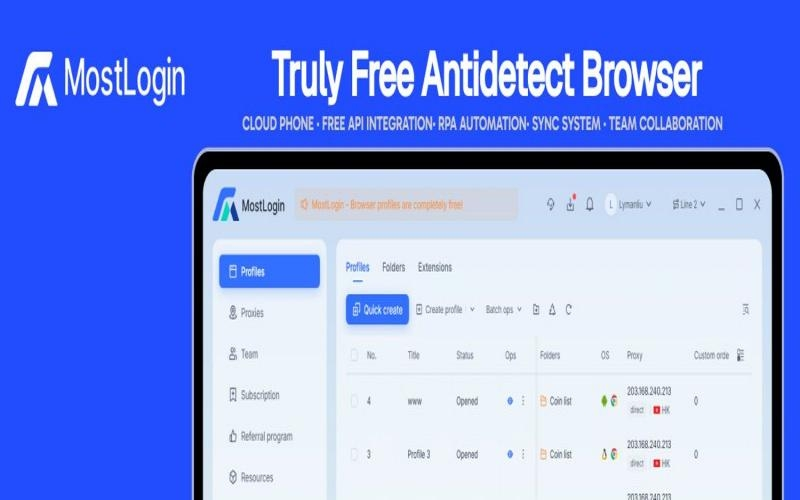
1. MostLogin's Core Advantages: Independent Environments and Anti-Detection Mechanisms
At the heart of MostLogin is its advanced virtual identity isolation technology, which creates independent browser environments for each account. This means every browser profile has unique browser fingerprints, local storage, Cookies, and cache, ensuring platforms cannot link multiple accounts to identify them as the same user device. This independent identity container design allows users to operate multiple accounts as if using completely different devices, avoiding common account ban risks.
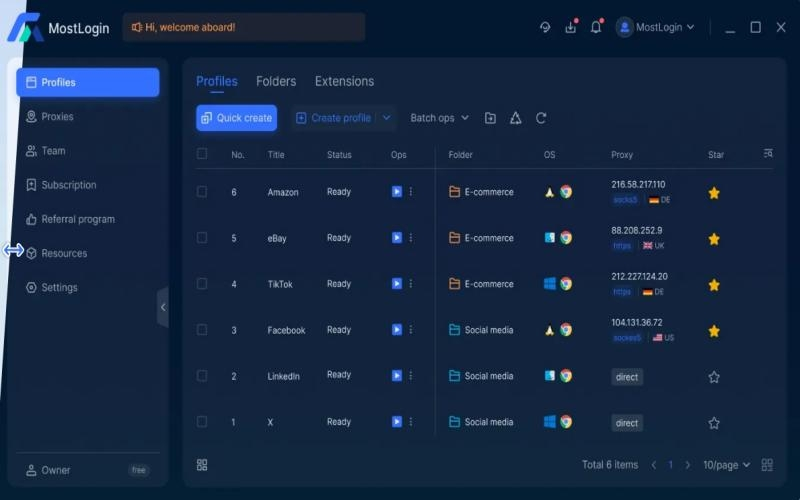
Additionally, MostLogin supports flexible multi-IP strategy configurations, including HTTP and SOCKS5 proxies. Users can easily pair static IPs or residential IPs to simulate login environments from different countries and regions. This is particularly useful for those needing global IP resources, such as cross-border e-commerce account management or international social media marketing. By integrating high-quality residential IPs from over 200 countries worldwide, MostLogin helps users bypass geographic restrictions and achieve true multi-regional operations.
In terms of team collaboration, MostLogin's cross-device collaboration feature allows members to share browser profiles and synchronize operations under permission controls. This significantly boosts team efficiency and is suitable for large enterprises' employee management and group control synchronization systems. Whether for remote collaboration or real-time monitoring, it can be achieved seamlessly without worrying about data leaks.
2. Pricing Policy: Browser Free, Cloud Phone Affordable
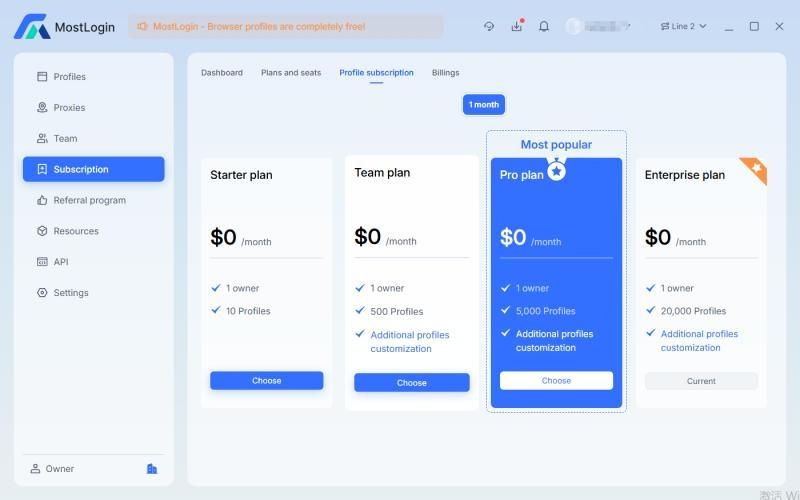
MostLogin's biggest appeal lies in its free policy. The Antidect Browser environment is completely free, allowing users to enjoy core functions without any fees, including web multi-opening, account anti-association, API interfaces, RPA automation, and group control systems. Only the cloud phone features incur charges, and at prices below industry standards. This has enabled MostLogin to rapidly rise in the 2025 Antidect Browser market, becoming the top choice for individual users and enterprise teams. Compared to other paid tools, it delivers efficient, secure, and zero-cost experiences, helping users gain an edge in competitive environments.
3. How to Integrate IPPeak With MostLogin
Step 1:
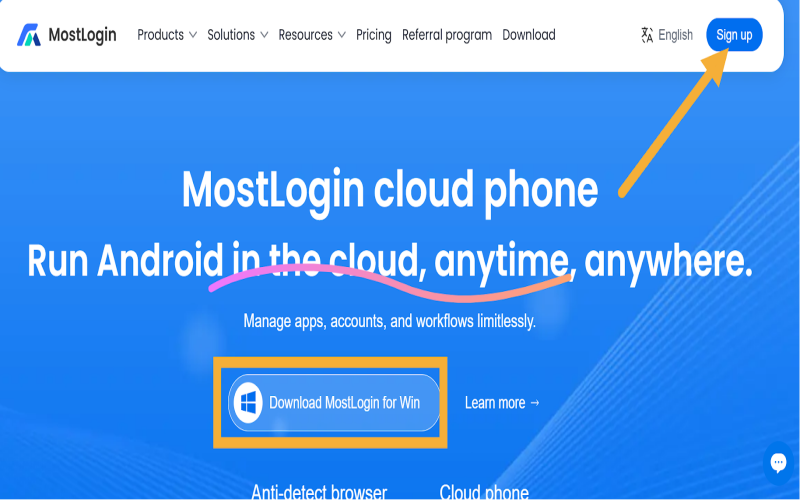
Visit MostLogin and register using your Google account or other mails, download the application.
Step 2:
Open MostLogin and go to "Profiles" → "Quick Create."
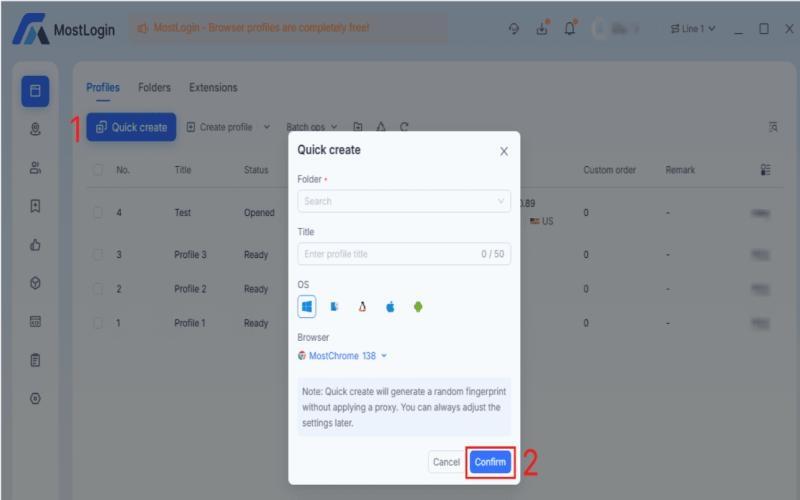
Fill in the profile information (name, operating system, browser, etc.) and click "Confirm."
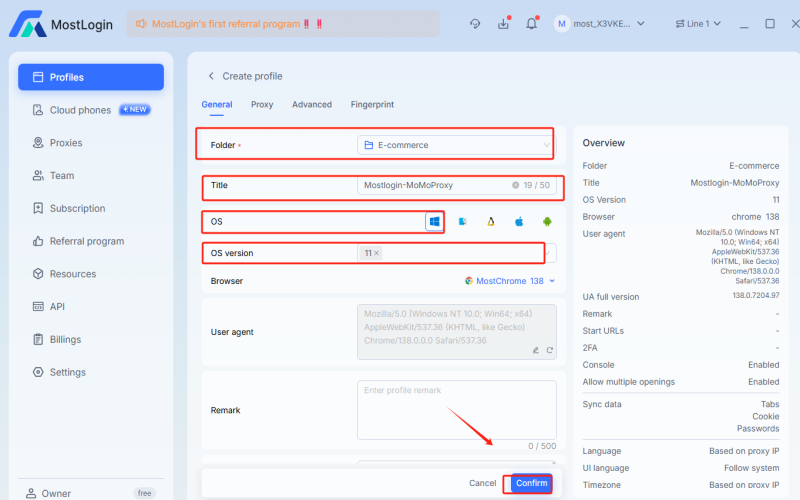
Step 3:
Locate Proxy Settings: In the MostLogin profile creation/editing window, find the tab or section labeled "Proxy."
Select Proxy Type: Choose the protocol you noted from IPPeak, either HTTP or SOCKS5.
Paste Proxy Details: Enter the proxy information obtained from IPPeak, including the proxy host and port. If using username/password authentication, also include your credentials.
Step 4:
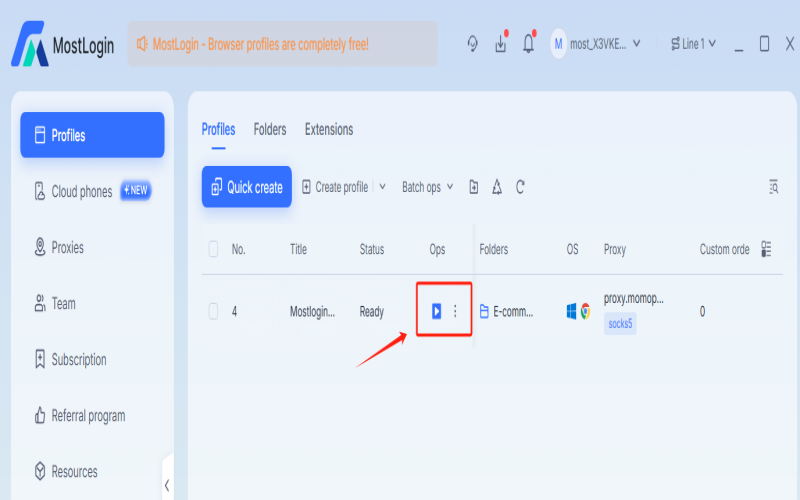
Save and start: After the proxy test is successful, click "Confirm" to save the configuration file. Click "Open" to launch a new browser window.
You might also enjoy

Understanding Transparent Proxy: Working Principle and Practical Deployment
Transparent proxy: no client config, auto traffic intercept. Covers working principle, Linux setup, and residential proxy rotation.
November 14.2025
Beyond Just "Relay": A Hardcore Interpretation of Network Proxy Principles
A hardcore breakdown of proxies' hidden capabilities: filtering, caching, load balancing, and how residential proxies achieve true invisibility
November 14.2025

Tunnel Proxy Explained: Principles, Advantages, and Use Cases
Tunnel proxies: mechanism, advantages, and use cases — to overcome crawler blocking and network challenges
November 14.2025
'%3e%3cg%20id='装饰物左'%20transform='translate(70,%20789.5)%20scale(-1,%20-1)%20translate(-70,%20-789.5)translate(0,%20674)'%3e%3cmask%20id='mask-2'%20fill='white'%3e%3cuse%20xlink:href='%23path-1'%3e%3c/use%3e%3c/mask%3e%3cg%20id='矩形'%3e%3c/g%3e%3cg%20id='bg-graphic-5'%20mask='url(%23mask-2)'%3e%3cg%20transform='translate(0,%20-23)'%3e%3cline%20x1='140.97459'%20y1='23.29327'%20x2='66.47459'%20y2='97.7934'%20id='路径'%20stroke='%23DFE6F3'%20stroke-width='1'%20fill='none'%3e%3c/line%3e%3cline%20x1='140.99959'%20y1='154.6709'%20x2='79.99999'%20y2='215.6709'%20id='路径'%20stroke='%23DFE6F3'%20stroke-width='1'%20fill='none'%3e%3c/line%3e%3cline%20x1='140.99959'%20y1='110.2705'%20x2='24.44919'%20y2='226.8209'%20id='路径'%20stroke='%23DFE6F3'%20stroke-width='1'%20fill='none'%3e%3c/line%3e%3cline%20x1='140.99959'%20y1='64.945'%20x2='0'%20y2='205.9449'%20id='路径'%20stroke='%23DFE6F3'%20stroke-width='1'%20fill='none'%3e%3c/line%3e%3cline%20x1='140.99959'%20y1='196.2959'%20x2='83.64959'%20y2='253.6469'%20id='路径'%20stroke='%23DFE6F3'%20stroke-width='1'%20fill='none'%3e%3c/line%3e%3cline%20x1='141.35359'%20y1='110.6238'%20x2='89.97929'%20y2='161.9979'%20id='路径'%20stroke='%237868E6'%20stroke-width='2'%20fill='none'%3e%3c/line%3e%3cline%20x1='164.70859'%20y1='0'%20x2='113.33459'%20y2='51.3743'%20id='路径'%20stroke='%237868E6'%20stroke-width='2'%20fill='none'%3e%3c/line%3e%3ccircle%20id='椭圆形'%20stroke='%237868E6'%20stroke-width='2'%20fill='%23E1DDFD'%20fill-rule='nonzero'%20cx='86.61909'%20cy='165.2909'%20r='5'%3e%3c/circle%3e%3cline%20x1='117.47459'%20y1='178.4359'%20x2='103.61959'%20y2='192.2909'%20id='路径'%20stroke='%237868E6'%20stroke-width='1'%20fill='none'%3e%3c/line%3e%3cline%20x1='69.83009'%20y1='136.2929'%20x2='55.97459'%20y2='150.1489'%20id='路径'%20stroke='%237868E6'%20stroke-width='1'%20fill='none'%3e%3c/line%3e%3ccircle%20id='椭圆形'%20stroke='%237868E6'%20stroke-width='2'%20fill='%23E1DDFD'%20fill-rule='nonzero'%20cx='109.97459'%20cy='54.6672'%20r='5'%3e%3c/circle%3e%3c/g%3e%3c/g%3e%3c/g%3e%3c/g%3e%3c/g%3e%3c/svg%3e)
'%3e%3cg%20id='装饰物右'%20transform='translate(1780,%20214)'%3e%3cmask%20id='mask-2'%20fill='white'%3e%3cuse%20xlink:href='%23path-1'%3e%3c/use%3e%3c/mask%3e%3cg%20id='矩形'%3e%3c/g%3e%3cg%20id='bg-graphic-5'%20mask='url(%23mask-2)'%3e%3cg%20transform='translate(0,%20-23)'%3e%3cline%20x1='140.97459'%20y1='23.29327'%20x2='66.47459'%20y2='97.7934'%20id='路径'%20stroke='%23DFE6F3'%20stroke-width='1'%20fill='none'%3e%3c/line%3e%3cline%20x1='140.99959'%20y1='154.6709'%20x2='79.99999'%20y2='215.6709'%20id='路径'%20stroke='%23DFE6F3'%20stroke-width='1'%20fill='none'%3e%3c/line%3e%3cline%20x1='140.99959'%20y1='110.2705'%20x2='24.44919'%20y2='226.8209'%20id='路径'%20stroke='%23DFE6F3'%20stroke-width='1'%20fill='none'%3e%3c/line%3e%3cline%20x1='140.99959'%20y1='64.945'%20x2='0'%20y2='205.9449'%20id='路径'%20stroke='%23DFE6F3'%20stroke-width='1'%20fill='none'%3e%3c/line%3e%3cline%20x1='140.99959'%20y1='196.2959'%20x2='83.64959'%20y2='253.6469'%20id='路径'%20stroke='%23DFE6F3'%20stroke-width='1'%20fill='none'%3e%3c/line%3e%3cline%20x1='141.35359'%20y1='110.6238'%20x2='89.97929'%20y2='161.9979'%20id='路径'%20stroke='%237868E6'%20stroke-width='2'%20fill='none'%3e%3c/line%3e%3cline%20x1='164.70859'%20y1='0'%20x2='113.33459'%20y2='51.3743'%20id='路径'%20stroke='%237868E6'%20stroke-width='2'%20fill='none'%3e%3c/line%3e%3ccircle%20id='椭圆形'%20stroke='%237868E6'%20stroke-width='2'%20fill='%23E1DDFD'%20fill-rule='nonzero'%20cx='86.61909'%20cy='165.2909'%20r='5'%3e%3c/circle%3e%3cline%20x1='117.47459'%20y1='178.4359'%20x2='103.61959'%20y2='192.2909'%20id='路径'%20stroke='%237868E6'%20stroke-width='1'%20fill='none'%3e%3c/line%3e%3cline%20x1='69.83009'%20y1='136.2929'%20x2='55.97459'%20y2='150.1489'%20id='路径'%20stroke='%237868E6'%20stroke-width='1'%20fill='none'%3e%3c/line%3e%3ccircle%20id='椭圆形'%20stroke='%237868E6'%20stroke-width='2'%20fill='%23E1DDFD'%20fill-rule='nonzero'%20cx='109.97459'%20cy='54.6672'%20r='5'%3e%3c/circle%3e%3c/g%3e%3c/g%3e%3c/g%3e%3c/g%3e%3c/g%3e%3c/svg%3e)
© Copyright 2026 ippeak.com. All rights reserved.


