'%20stroke='%23ADB7CD'%3e%3cg%20id='斜线'%20transform='translate(466,%20173)'%3e%3cline%20x1='0'%20y1='10'%20x2='5'%20y2='0'%20id='路径'%3e%3c/line%3e%3c/g%3e%3c/g%3e%3c/g%3e%3c/svg%3e)
How to Use IPPeak in VMLogin
How to Use IPPeak in VMLogin
'%20fill='%23ADB7CD'%20fill-rule='nonzero'%3e%3cg%20id='日期'%20transform='translate(428,%20369)'%3e%3cpath%20d='M15,2%20L19,2%20C19.2652,2%2019.5196,2.10536%2019.7071,2.29289%20C19.8946,2.48043%2020,2.73478%2020,3%20L20,19%20C20,19.2652%2019.8946,19.5196%2019.7071,19.7071%20C19.5196,19.8946%2019.2652,20%2019,20%20L1,20%20C0.73478,20%200.48043,19.8946%200.29289,19.7071%20C0.10536,19.5196%200,19.2652%200,19%20L0,3%20C0,2.73478%200.10536,2.48043%200.29289,2.29289%20C0.48043,2.10536%200.73478,2%201,2%20L5,2%20L5,0%20L7,0%20L7,2%20L13,2%20L13,0%20L15,0%20L15,2%20Z%20M13,4%20L7,4%20L7,6%20L5,6%20L5,4%20L2,4%20L2,8%20L18,8%20L18,4%20L15,4%20L15,6%20L13,6%20L13,4%20Z%20M18,10%20L2,10%20L2,18%20L18,18%20L18,10%20Z%20M4,13%20L6,13%20L6,15%20L4,15%20L4,13%20Z%20M8,13%20L16,13%20L16,15%20L8,15%20L8,13%20Z'%20id='形状'%3e%3c/path%3e%3c/g%3e%3c/g%3e%3c/g%3e%3c/svg%3e) February 25.2026
February 25.2026
This document provides a step-by-step guide on how to use an IPPeak proxy with VMLogin.
Step 1. Visit the IPPeak Official Website
● Open the IPPeak official website.
● Register a new account using your email and password.
● If you already have an account, log in directly.
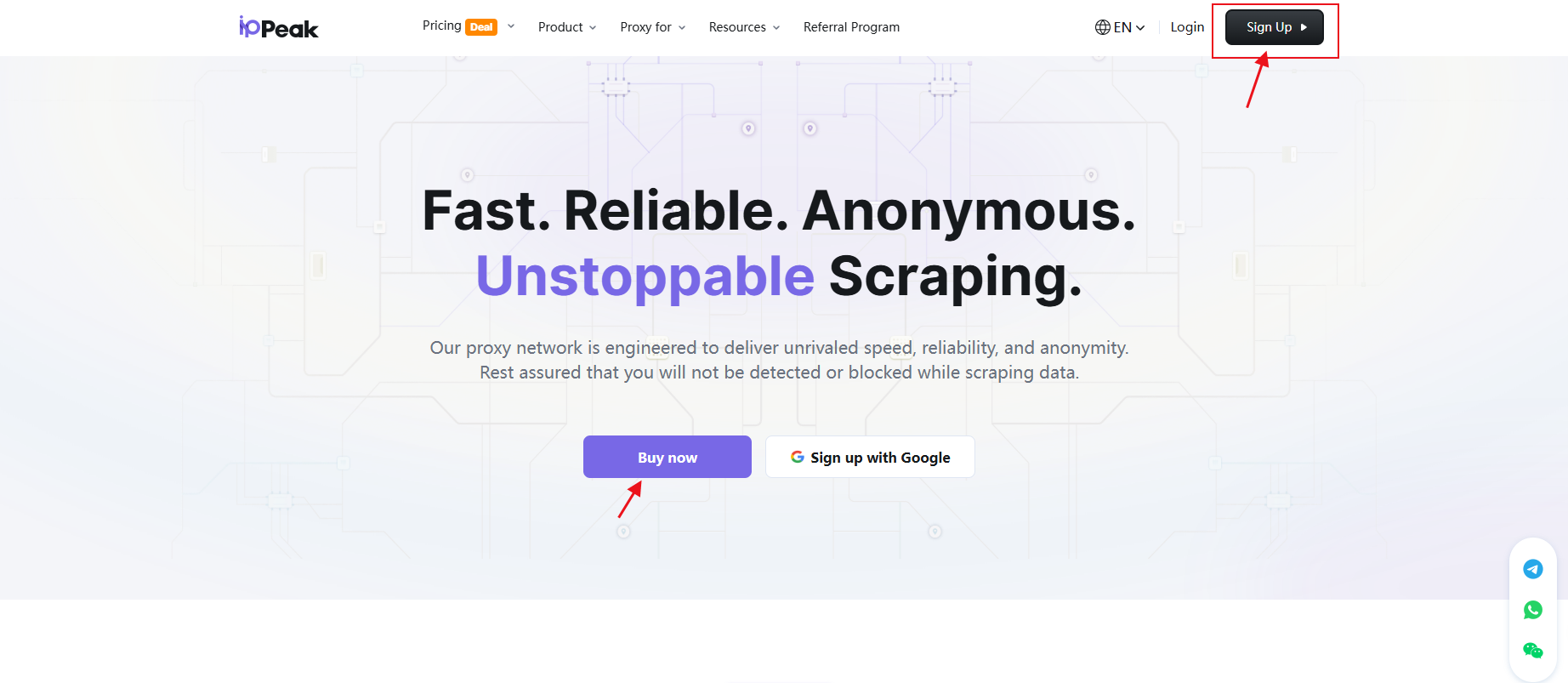
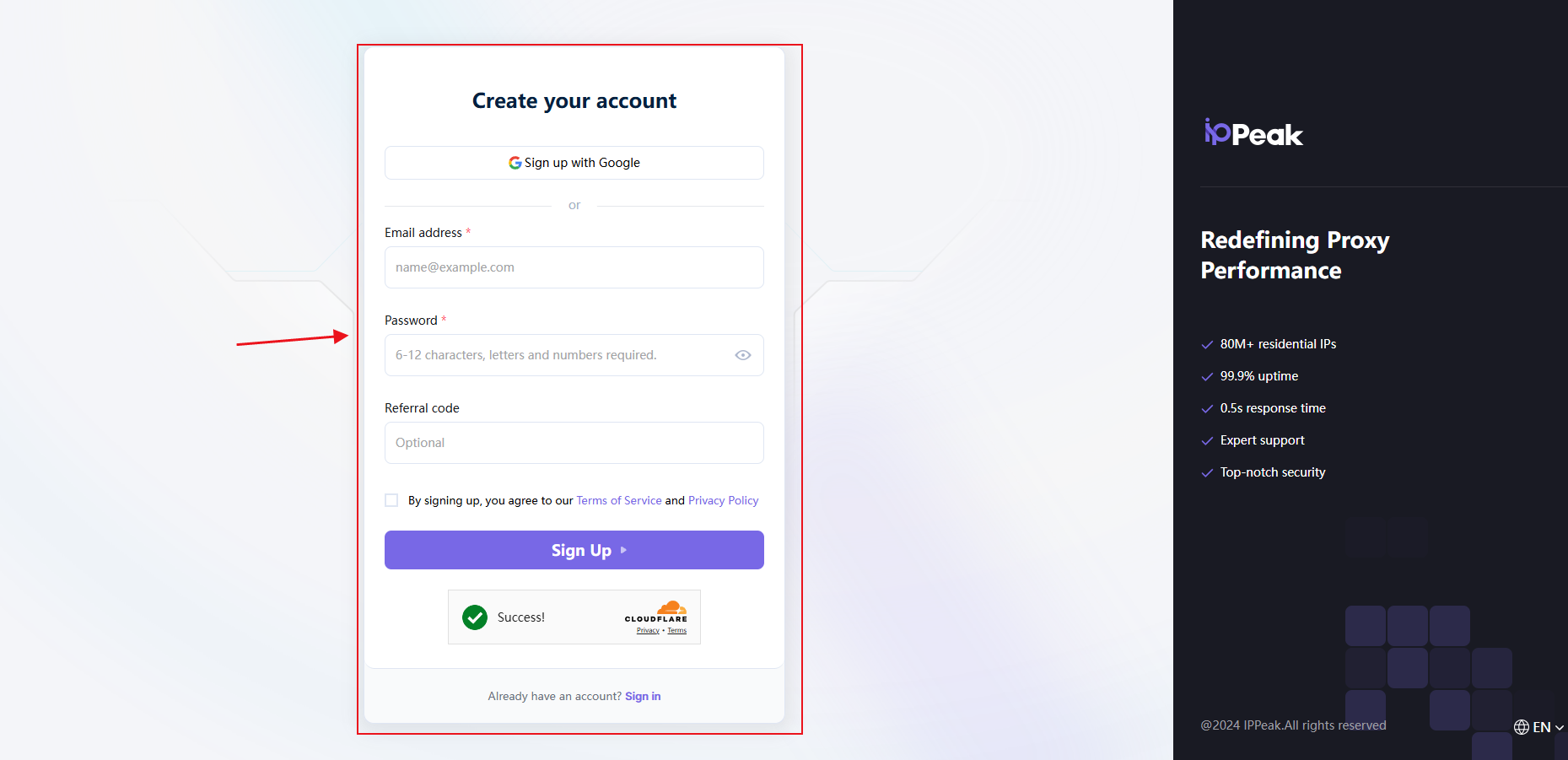
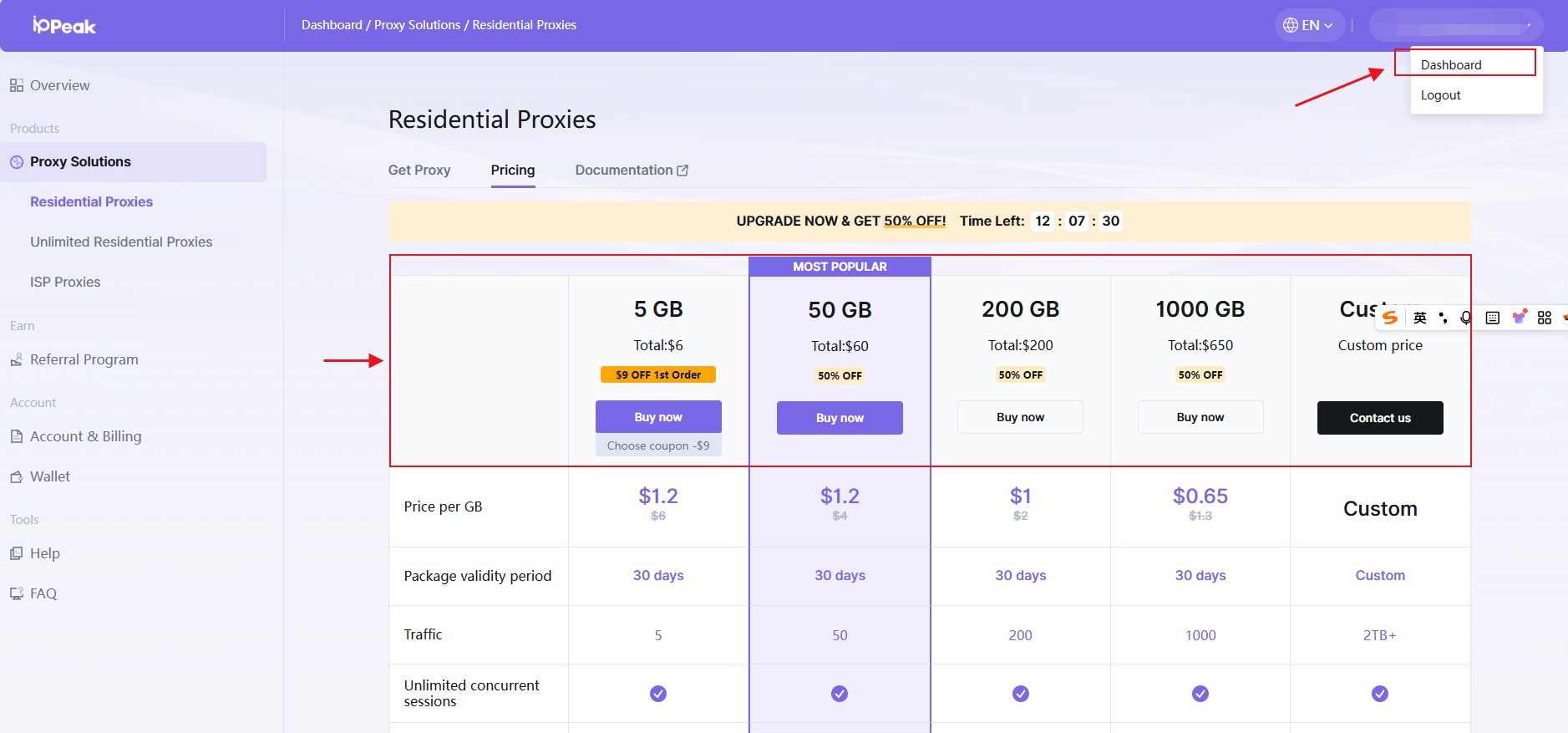
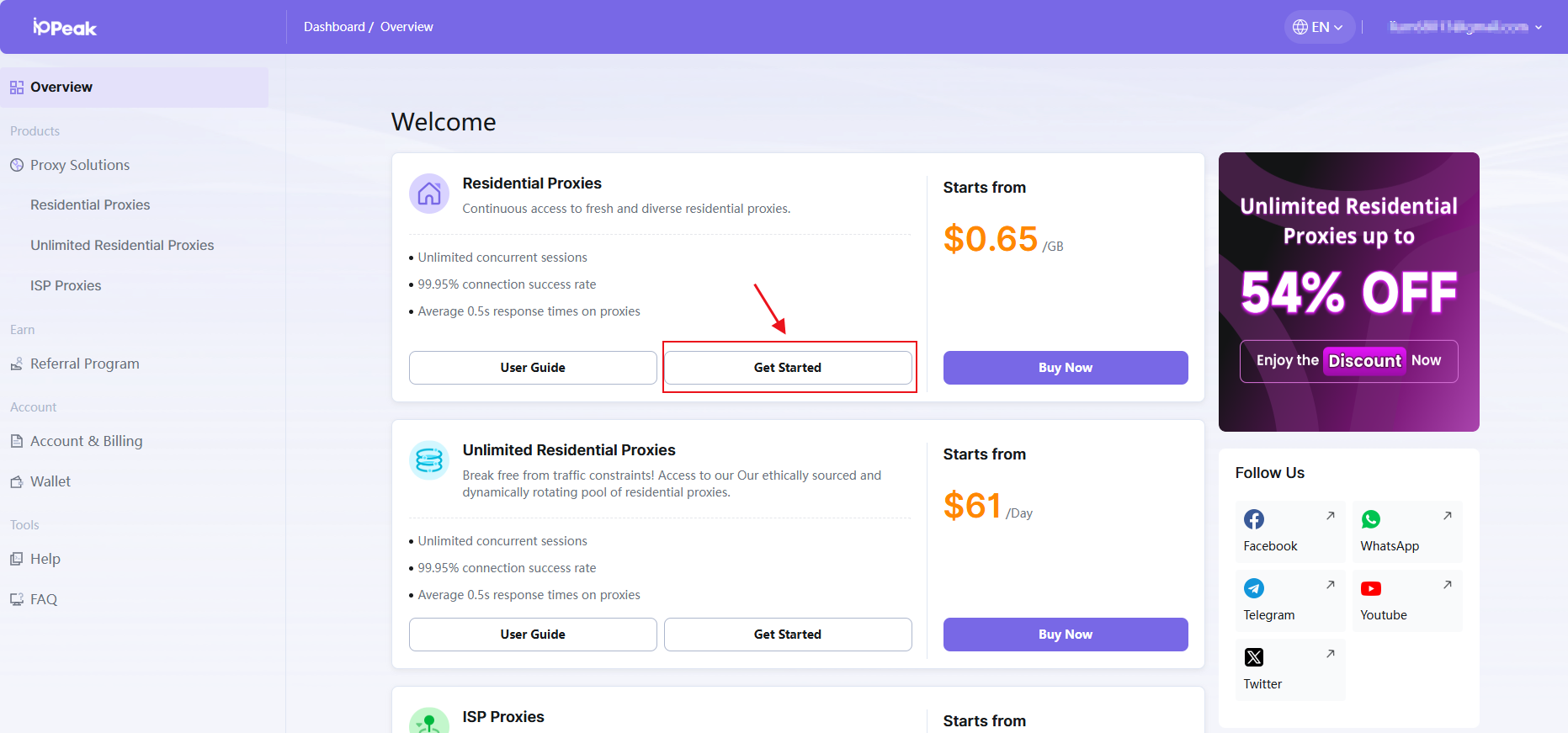
Step 2. Choose a Proxy Plan and Access the Dashboard
● After logging in, Select the proxy type you need (Residential Proxy is used as an example).
● Complete the purchase process.
● After payment, click 【Dashboard】, then select 【Get Started】.
● You will be directed to the proxy management and configuration interface.
Step 3. Configure Proxy Parameters
IPPeak supports Username/Password and IP Whitelist authentication.
This guide uses Username/Password authentication as an example.
Configure the following settings:
● Target country/region (or random)
● Sub-user
● Session type
● Proxy host
● Proxy port
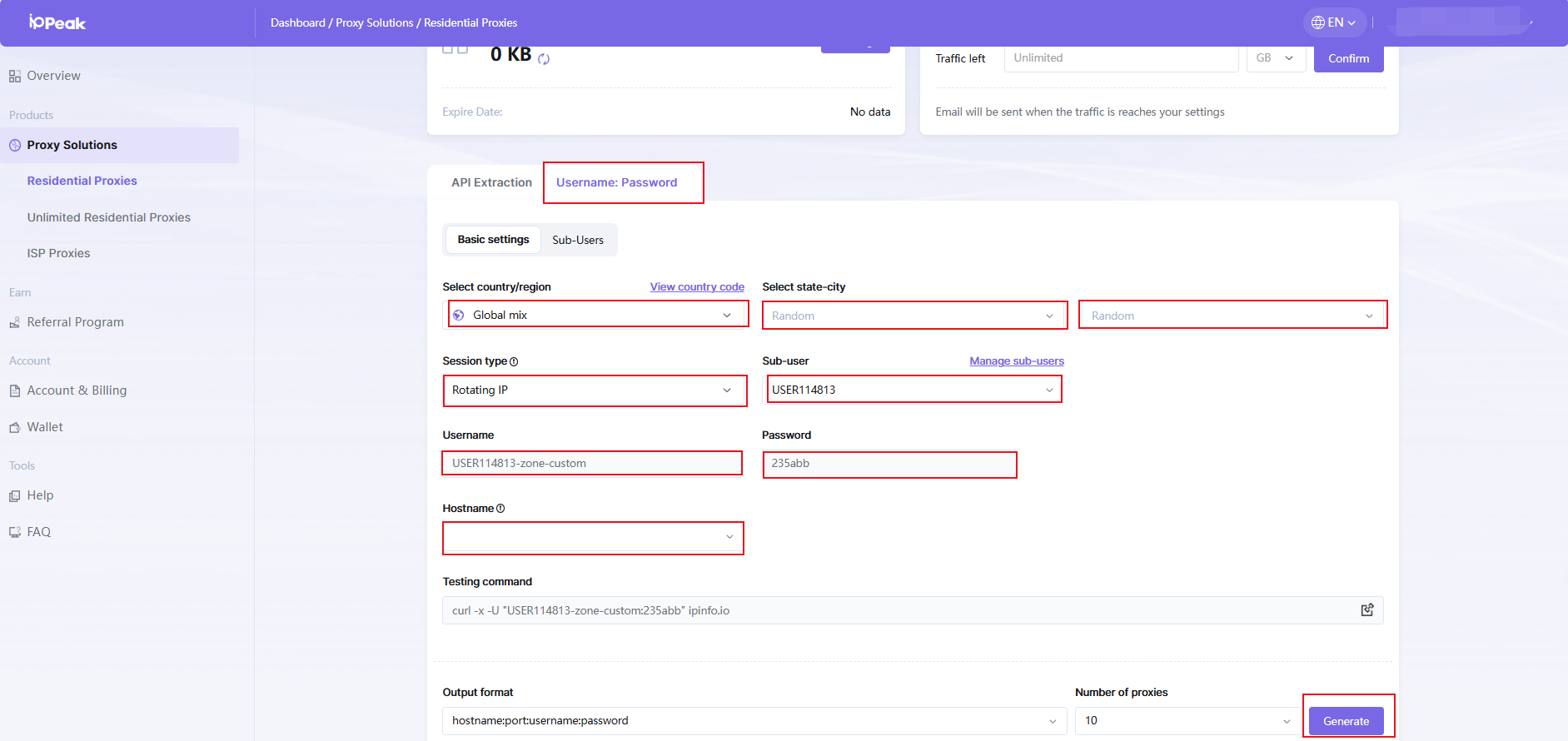
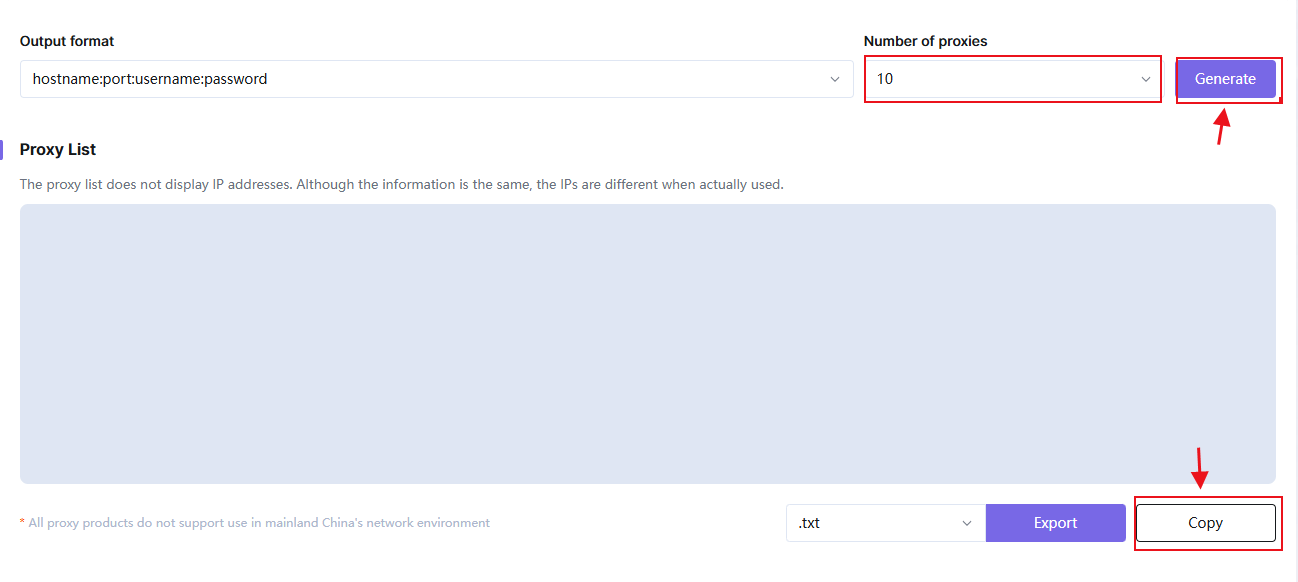
Step 4. Generate Proxy Credentials
● After the parameters are configured:
● Set the number of proxies required
● Click “Generate”
● Copy the generated IP, Port, Username, and Password.
Step 5. Download and Launch VMLogin
● Download VMLogin from the official website.
● Install and open the application.
● Free Trial Available:https://www.vmlogin.us/?ref=ippeak
Step 6. Create a New Browser Profile
● Click “Create Browser Profile”
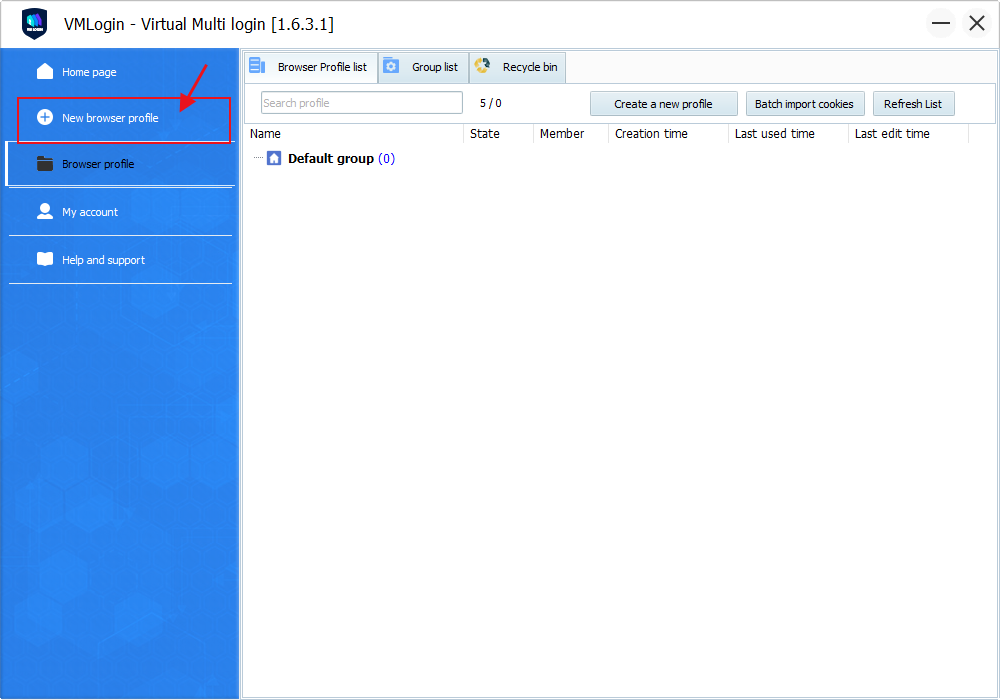
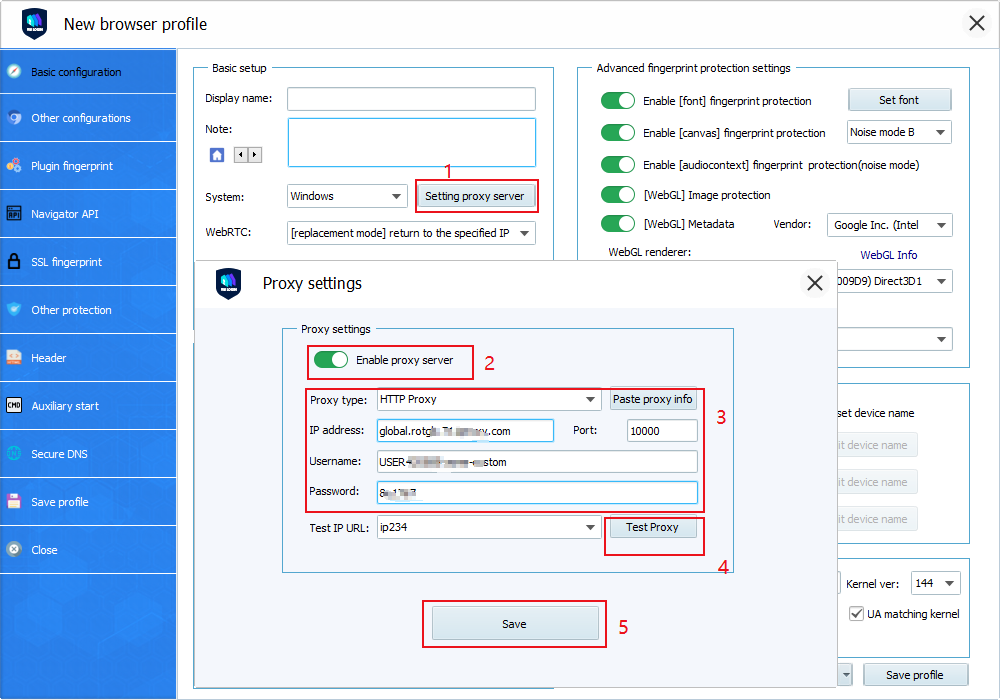
Step 7. Configure, Test, and Save the Proxy in VMLogin
1.Go to Basic configuration → Proxy settings
2.Enable “Use proxy server”
3.Enter the proxy information from IPPeak:
● Proxy type: HTTP Proxy (You can also choose SOCKS5 as the proxy type)
● IP address: Proxy Host (refer to the proxy information generated in IPPeak)
● Port: Proxy Port (refer to the proxy information generated in IPPeak)
● Username: Proxy Username
● Password: Proxy Password
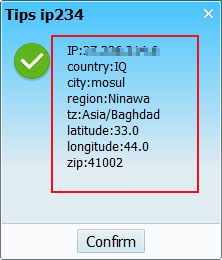
4.Click “Test Proxy”
5.Confirm that the IP address and location are displayed correctly
6.Save the settings
Step 8. Open the Browser and Start Using IPPeak
- Launch the browser profile
- Your IPPeak proxy is now active and ready to use
You might also enjoy

Email Scraping Explained: A Complete Guide to Technical Principles, Tool Systems, and Compliance Boundaries
Comprehensive guide to email scraping principles, automation tools, legal compliance boundaries, network risks, and sustainable data management strategies.
February 25.2026
How to Use IPPeak in VMLogin
This document provides a step-by-step guide on how to use an IPPeak proxy with VMLogin.
February 25.2026

LinkedIn Data Ecosystem Trends in 2026: How Enterprises Can Build a Stable Data Acquisition System
Analyzes LinkedIn data trends in 2026, highlighting compliance, stability, and how residential proxies like IPPeak ensure reliable, scalable data access.
February 25.2026
'%3e%3cg%20id='装饰物左'%20transform='translate(70,%20789.5)%20scale(-1,%20-1)%20translate(-70,%20-789.5)translate(0,%20674)'%3e%3cmask%20id='mask-2'%20fill='white'%3e%3cuse%20xlink:href='%23path-1'%3e%3c/use%3e%3c/mask%3e%3cg%20id='矩形'%3e%3c/g%3e%3cg%20id='bg-graphic-5'%20mask='url(%23mask-2)'%3e%3cg%20transform='translate(0,%20-23)'%3e%3cline%20x1='140.97459'%20y1='23.29327'%20x2='66.47459'%20y2='97.7934'%20id='路径'%20stroke='%23DFE6F3'%20stroke-width='1'%20fill='none'%3e%3c/line%3e%3cline%20x1='140.99959'%20y1='154.6709'%20x2='79.99999'%20y2='215.6709'%20id='路径'%20stroke='%23DFE6F3'%20stroke-width='1'%20fill='none'%3e%3c/line%3e%3cline%20x1='140.99959'%20y1='110.2705'%20x2='24.44919'%20y2='226.8209'%20id='路径'%20stroke='%23DFE6F3'%20stroke-width='1'%20fill='none'%3e%3c/line%3e%3cline%20x1='140.99959'%20y1='64.945'%20x2='0'%20y2='205.9449'%20id='路径'%20stroke='%23DFE6F3'%20stroke-width='1'%20fill='none'%3e%3c/line%3e%3cline%20x1='140.99959'%20y1='196.2959'%20x2='83.64959'%20y2='253.6469'%20id='路径'%20stroke='%23DFE6F3'%20stroke-width='1'%20fill='none'%3e%3c/line%3e%3cline%20x1='141.35359'%20y1='110.6238'%20x2='89.97929'%20y2='161.9979'%20id='路径'%20stroke='%237868E6'%20stroke-width='2'%20fill='none'%3e%3c/line%3e%3cline%20x1='164.70859'%20y1='0'%20x2='113.33459'%20y2='51.3743'%20id='路径'%20stroke='%237868E6'%20stroke-width='2'%20fill='none'%3e%3c/line%3e%3ccircle%20id='椭圆形'%20stroke='%237868E6'%20stroke-width='2'%20fill='%23E1DDFD'%20fill-rule='nonzero'%20cx='86.61909'%20cy='165.2909'%20r='5'%3e%3c/circle%3e%3cline%20x1='117.47459'%20y1='178.4359'%20x2='103.61959'%20y2='192.2909'%20id='路径'%20stroke='%237868E6'%20stroke-width='1'%20fill='none'%3e%3c/line%3e%3cline%20x1='69.83009'%20y1='136.2929'%20x2='55.97459'%20y2='150.1489'%20id='路径'%20stroke='%237868E6'%20stroke-width='1'%20fill='none'%3e%3c/line%3e%3ccircle%20id='椭圆形'%20stroke='%237868E6'%20stroke-width='2'%20fill='%23E1DDFD'%20fill-rule='nonzero'%20cx='109.97459'%20cy='54.6672'%20r='5'%3e%3c/circle%3e%3c/g%3e%3c/g%3e%3c/g%3e%3c/g%3e%3c/g%3e%3c/svg%3e)
'%3e%3cg%20id='装饰物右'%20transform='translate(1780,%20214)'%3e%3cmask%20id='mask-2'%20fill='white'%3e%3cuse%20xlink:href='%23path-1'%3e%3c/use%3e%3c/mask%3e%3cg%20id='矩形'%3e%3c/g%3e%3cg%20id='bg-graphic-5'%20mask='url(%23mask-2)'%3e%3cg%20transform='translate(0,%20-23)'%3e%3cline%20x1='140.97459'%20y1='23.29327'%20x2='66.47459'%20y2='97.7934'%20id='路径'%20stroke='%23DFE6F3'%20stroke-width='1'%20fill='none'%3e%3c/line%3e%3cline%20x1='140.99959'%20y1='154.6709'%20x2='79.99999'%20y2='215.6709'%20id='路径'%20stroke='%23DFE6F3'%20stroke-width='1'%20fill='none'%3e%3c/line%3e%3cline%20x1='140.99959'%20y1='110.2705'%20x2='24.44919'%20y2='226.8209'%20id='路径'%20stroke='%23DFE6F3'%20stroke-width='1'%20fill='none'%3e%3c/line%3e%3cline%20x1='140.99959'%20y1='64.945'%20x2='0'%20y2='205.9449'%20id='路径'%20stroke='%23DFE6F3'%20stroke-width='1'%20fill='none'%3e%3c/line%3e%3cline%20x1='140.99959'%20y1='196.2959'%20x2='83.64959'%20y2='253.6469'%20id='路径'%20stroke='%23DFE6F3'%20stroke-width='1'%20fill='none'%3e%3c/line%3e%3cline%20x1='141.35359'%20y1='110.6238'%20x2='89.97929'%20y2='161.9979'%20id='路径'%20stroke='%237868E6'%20stroke-width='2'%20fill='none'%3e%3c/line%3e%3cline%20x1='164.70859'%20y1='0'%20x2='113.33459'%20y2='51.3743'%20id='路径'%20stroke='%237868E6'%20stroke-width='2'%20fill='none'%3e%3c/line%3e%3ccircle%20id='椭圆形'%20stroke='%237868E6'%20stroke-width='2'%20fill='%23E1DDFD'%20fill-rule='nonzero'%20cx='86.61909'%20cy='165.2909'%20r='5'%3e%3c/circle%3e%3cline%20x1='117.47459'%20y1='178.4359'%20x2='103.61959'%20y2='192.2909'%20id='路径'%20stroke='%237868E6'%20stroke-width='1'%20fill='none'%3e%3c/line%3e%3cline%20x1='69.83009'%20y1='136.2929'%20x2='55.97459'%20y2='150.1489'%20id='路径'%20stroke='%237868E6'%20stroke-width='1'%20fill='none'%3e%3c/line%3e%3ccircle%20id='椭圆形'%20stroke='%237868E6'%20stroke-width='2'%20fill='%23E1DDFD'%20fill-rule='nonzero'%20cx='109.97459'%20cy='54.6672'%20r='5'%3e%3c/circle%3e%3c/g%3e%3c/g%3e%3c/g%3e%3c/g%3e%3c/g%3e%3c/svg%3e)
- Popular Blogs
© 2024 IPPeak. All rights reserved