'%20stroke='%23ADB7CD'%3e%3cg%20id='斜线'%20transform='translate(466,%20173)'%3e%3cline%20x1='0'%20y1='10'%20x2='5'%20y2='0'%20id='路径'%3e%3c/line%3e%3c/g%3e%3c/g%3e%3c/g%3e%3c/svg%3e)
What to Do If You Can't Log Into Your X Account in 2026? A Complete Troubleshooting Guide
What to Do If You Can't Log Into Your X Account in 2026? A Complete Troubleshooting Guide
'%20fill='%23ADB7CD'%20fill-rule='nonzero'%3e%3cg%20id='日期'%20transform='translate(428,%20369)'%3e%3cpath%20d='M15,2%20L19,2%20C19.2652,2%2019.5196,2.10536%2019.7071,2.29289%20C19.8946,2.48043%2020,2.73478%2020,3%20L20,19%20C20,19.2652%2019.8946,19.5196%2019.7071,19.7071%20C19.5196,19.8946%2019.2652,20%2019,20%20L1,20%20C0.73478,20%200.48043,19.8946%200.29289,19.7071%20C0.10536,19.5196%200,19.2652%200,19%20L0,3%20C0,2.73478%200.10536,2.48043%200.29289,2.29289%20C0.48043,2.10536%200.73478,2%201,2%20L5,2%20L5,0%20L7,0%20L7,2%20L13,2%20L13,0%20L15,0%20L15,2%20Z%20M13,4%20L7,4%20L7,6%20L5,6%20L5,4%20L2,4%20L2,8%20L18,8%20L18,4%20L15,4%20L15,6%20L13,6%20L13,4%20Z%20M18,10%20L2,10%20L2,18%20L18,18%20L18,10%20Z%20M4,13%20L6,13%20L6,15%20L4,15%20L4,13%20Z%20M8,13%20L16,13%20L16,15%20L8,15%20L8,13%20Z'%20id='形状'%3e%3c/path%3e%3c/g%3e%3c/g%3e%3c/g%3e%3c/svg%3e) April 28.2026
April 28.2026
With the growing popularity of overseas applications, X (formerly Twitter) has become an important tool for cross-border communication, information access, and social media marketing. However, as X’s risk control policies continue to tighten, users—especially those in restricted network environments—often encounter various login issues, such as being unable to log in, limited functionality, or prompts indicating suspicious activity.
To help users log in smoothly and ensure account security, this article systematically outlines common login issues, their causes, and corresponding solutions. It also provides practical security recommendations to help minimize login-related problems.

Why Is Your X Account Abnormal or Unable to Log In?
Login issues on X typically fall into three categories: network environment, app version, and account-related restrictions. These are also key factors to pay attention to when using overseas applications.
Network and Regional Restrictions
Due to access limitations in certain regions, users often need to rely on proxy services to access the X platform. With evolving risk control mechanisms, unstable proxy nodes or poor network quality may lead to abnormal login requests.
App Version Issues
Outdated app versions or compatibility problems can also cause login failures or error prompts. For example, an app that hasn’t been updated in time may not match the platform’s latest API protocols.
If X detects suspicious behavior—such as multiple incorrect password attempts, use of third-party tools, or bulk operations—it may trigger account protection mechanisms, temporarily preventing login.
Device Fingerprint Flagged as Abnormal
X collects device-related information (such as device model and system version) to generate a unique device fingerprint. If a device is flagged as abnormal, login attempts from that device may be restricted.
In practice, different accounts may encounter different login issues. To truly resolve them, it’s important to analyze the specific scenario and apply targeted solutions rather than using a one-size-fits-all approach.
Common X Login Issues and Solutions
1. Unable to Redirect via Google Login
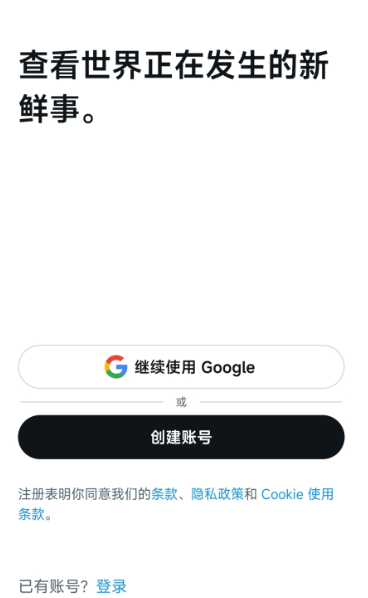
When logging into X using the “Continue with Google” option, users may complete Google authorization but remain stuck on the login page without being redirected.
Possible causes: slow network requests or Google authorization issues.
Solutions:
Switch to a different IP/network and try again
Log into your Google account separately in Chrome, then retry logging into X
Use email and password to log in directly
2. Incorrect Username/Password
After entering credentials, the system displays “Incorrect username or password,” which may be due to input format errors.
Solutions:
Check your username format (usernames start with “@” and must include it when logging in)
Click “Forgot password” to reset your password
If your account is linked to an email, use email + password to log in
3. App Login Fails but Web Login Works
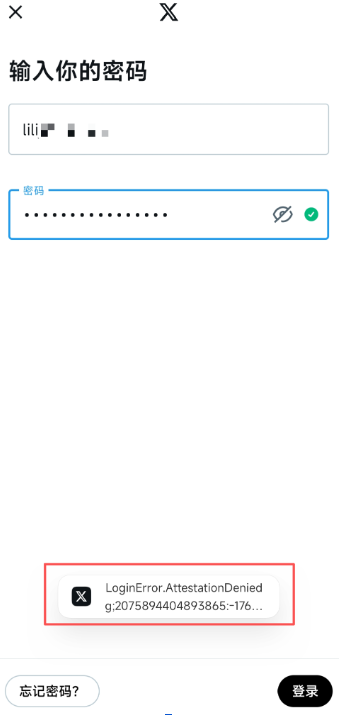
If login fails on the app but works on the web version, the issue is likely related to the app version or device environment.
Solutions:
Update Google Play and ensure the X app is the latest version; clear app cache if needed
Try logging in from another device to eliminate device-related issues
4. Username Verification Required
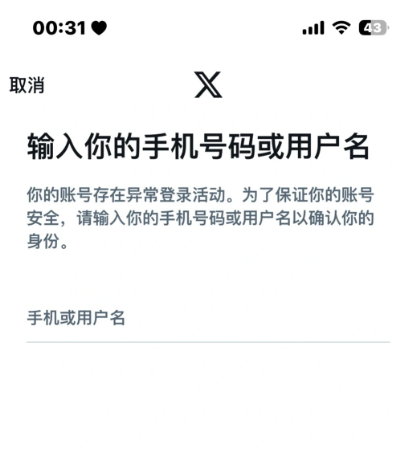
If prompted to verify your identity due to suspicious activity, you may need to enter account-related information. If your account is not linked to a phone number and you’ve forgotten your username, verification may fail.
Solutions:
For email-registered accounts, click “Report a problem” → “Lost Access help” to retrieve your username via email verification
Check previous emails from X, which usually contain your username
How to Secure Your X Account
After successfully logging in, it’s important to implement proper security measures to ensure long-term account stability and reduce the risk of future restrictions.
Bind Email/Phone Number:
Link a frequently used email or phone number to recover your account or receive verification codes.
Enable Two-Factor Authentication (2FA):
2FA significantly enhances account security. You can choose SMS, authenticator apps, or security keys (web version supports backup codes).
Regularly Check Account Activity:
Keep your app updated and review login history and devices. Change your password immediately if any suspicious activity is detected.
Maintain a Stable Login Environment:
Avoid frequently switching devices or networks. For teams managing multiple X accounts, consider using cloud phone solutions for centralized management.
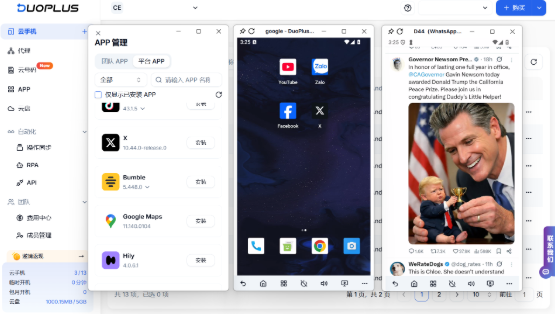
DuoPlus cloud phone supports unlimited Android instances. When combined with IPPeak’s global high-quality residential proxy services, it can effectively isolate multiple overseas accounts.
Each environment has independent device parameters and network configurations, significantly reducing the risk of account detection and restrictions.
Whether you’re managing X, TikTok, Instagram, or Reddit accounts, DuoPlus enables long-term, stable operation—making it ideal for cross-border multi-account scenarios.
You might also enjoy
How Proxy IPs Enable Global Brand Infringement Monitoring and Early Warning
Protect your brand globally with proxy IPs for real-time infringement monitoring and early warning of counterfeits.
April 28.2026
Why Do Proxy IP Prices Vary So Much?
Proxy IP prices vary widely due to differences in IP quality, network size, location coverage, performance, and infrastructure costs.
April 28.2026
Proxy IP Use Cases and Applications Explained: Unexpected Ways to Unlock More Value
As internet-based businesses continue to evolve, proxy IPs are no longer tools used exclusively by technical professionals.
April 28.2026
'%3e%3cg%20id='装饰物左'%20transform='translate(70,%20789.5)%20scale(-1,%20-1)%20translate(-70,%20-789.5)translate(0,%20674)'%3e%3cmask%20id='mask-2'%20fill='white'%3e%3cuse%20xlink:href='%23path-1'%3e%3c/use%3e%3c/mask%3e%3cg%20id='矩形'%3e%3c/g%3e%3cg%20id='bg-graphic-5'%20mask='url(%23mask-2)'%3e%3cg%20transform='translate(0,%20-23)'%3e%3cline%20x1='140.97459'%20y1='23.29327'%20x2='66.47459'%20y2='97.7934'%20id='路径'%20stroke='%23DFE6F3'%20stroke-width='1'%20fill='none'%3e%3c/line%3e%3cline%20x1='140.99959'%20y1='154.6709'%20x2='79.99999'%20y2='215.6709'%20id='路径'%20stroke='%23DFE6F3'%20stroke-width='1'%20fill='none'%3e%3c/line%3e%3cline%20x1='140.99959'%20y1='110.2705'%20x2='24.44919'%20y2='226.8209'%20id='路径'%20stroke='%23DFE6F3'%20stroke-width='1'%20fill='none'%3e%3c/line%3e%3cline%20x1='140.99959'%20y1='64.945'%20x2='0'%20y2='205.9449'%20id='路径'%20stroke='%23DFE6F3'%20stroke-width='1'%20fill='none'%3e%3c/line%3e%3cline%20x1='140.99959'%20y1='196.2959'%20x2='83.64959'%20y2='253.6469'%20id='路径'%20stroke='%23DFE6F3'%20stroke-width='1'%20fill='none'%3e%3c/line%3e%3cline%20x1='141.35359'%20y1='110.6238'%20x2='89.97929'%20y2='161.9979'%20id='路径'%20stroke='%237868E6'%20stroke-width='2'%20fill='none'%3e%3c/line%3e%3cline%20x1='164.70859'%20y1='0'%20x2='113.33459'%20y2='51.3743'%20id='路径'%20stroke='%237868E6'%20stroke-width='2'%20fill='none'%3e%3c/line%3e%3ccircle%20id='椭圆形'%20stroke='%237868E6'%20stroke-width='2'%20fill='%23E1DDFD'%20fill-rule='nonzero'%20cx='86.61909'%20cy='165.2909'%20r='5'%3e%3c/circle%3e%3cline%20x1='117.47459'%20y1='178.4359'%20x2='103.61959'%20y2='192.2909'%20id='路径'%20stroke='%237868E6'%20stroke-width='1'%20fill='none'%3e%3c/line%3e%3cline%20x1='69.83009'%20y1='136.2929'%20x2='55.97459'%20y2='150.1489'%20id='路径'%20stroke='%237868E6'%20stroke-width='1'%20fill='none'%3e%3c/line%3e%3ccircle%20id='椭圆形'%20stroke='%237868E6'%20stroke-width='2'%20fill='%23E1DDFD'%20fill-rule='nonzero'%20cx='109.97459'%20cy='54.6672'%20r='5'%3e%3c/circle%3e%3c/g%3e%3c/g%3e%3c/g%3e%3c/g%3e%3c/g%3e%3c/svg%3e)
'%3e%3cg%20id='装饰物右'%20transform='translate(1780,%20214)'%3e%3cmask%20id='mask-2'%20fill='white'%3e%3cuse%20xlink:href='%23path-1'%3e%3c/use%3e%3c/mask%3e%3cg%20id='矩形'%3e%3c/g%3e%3cg%20id='bg-graphic-5'%20mask='url(%23mask-2)'%3e%3cg%20transform='translate(0,%20-23)'%3e%3cline%20x1='140.97459'%20y1='23.29327'%20x2='66.47459'%20y2='97.7934'%20id='路径'%20stroke='%23DFE6F3'%20stroke-width='1'%20fill='none'%3e%3c/line%3e%3cline%20x1='140.99959'%20y1='154.6709'%20x2='79.99999'%20y2='215.6709'%20id='路径'%20stroke='%23DFE6F3'%20stroke-width='1'%20fill='none'%3e%3c/line%3e%3cline%20x1='140.99959'%20y1='110.2705'%20x2='24.44919'%20y2='226.8209'%20id='路径'%20stroke='%23DFE6F3'%20stroke-width='1'%20fill='none'%3e%3c/line%3e%3cline%20x1='140.99959'%20y1='64.945'%20x2='0'%20y2='205.9449'%20id='路径'%20stroke='%23DFE6F3'%20stroke-width='1'%20fill='none'%3e%3c/line%3e%3cline%20x1='140.99959'%20y1='196.2959'%20x2='83.64959'%20y2='253.6469'%20id='路径'%20stroke='%23DFE6F3'%20stroke-width='1'%20fill='none'%3e%3c/line%3e%3cline%20x1='141.35359'%20y1='110.6238'%20x2='89.97929'%20y2='161.9979'%20id='路径'%20stroke='%237868E6'%20stroke-width='2'%20fill='none'%3e%3c/line%3e%3cline%20x1='164.70859'%20y1='0'%20x2='113.33459'%20y2='51.3743'%20id='路径'%20stroke='%237868E6'%20stroke-width='2'%20fill='none'%3e%3c/line%3e%3ccircle%20id='椭圆形'%20stroke='%237868E6'%20stroke-width='2'%20fill='%23E1DDFD'%20fill-rule='nonzero'%20cx='86.61909'%20cy='165.2909'%20r='5'%3e%3c/circle%3e%3cline%20x1='117.47459'%20y1='178.4359'%20x2='103.61959'%20y2='192.2909'%20id='路径'%20stroke='%237868E6'%20stroke-width='1'%20fill='none'%3e%3c/line%3e%3cline%20x1='69.83009'%20y1='136.2929'%20x2='55.97459'%20y2='150.1489'%20id='路径'%20stroke='%237868E6'%20stroke-width='1'%20fill='none'%3e%3c/line%3e%3ccircle%20id='椭圆形'%20stroke='%237868E6'%20stroke-width='2'%20fill='%23E1DDFD'%20fill-rule='nonzero'%20cx='109.97459'%20cy='54.6672'%20r='5'%3e%3c/circle%3e%3c/g%3e%3c/g%3e%3c/g%3e%3c/g%3e%3c/g%3e%3c/svg%3e)
© Copyright 2026 ippeak.com. All rights reserved.


